Gear and Goodies
My setup doesn’t change too frequently because I like to make the best of what I’ve got. This means curating those things carefully and dropping whatever falls out of use.
Computers
Desktop
My desktop PC (leafsprite) sits on my desk top (which is a Flexispot E7 w/ 160x80cm Bamboo Top). When speccing out the machine, I wasn’t specifically looking for RGB gamer lights on everything, but somehow I ended up with RGB on many key components. It’s all good!
Some specs:
- Board ➜ GigaByte Aorus X570 AORUS ELITE
- CPU ➜ AMD Ryzen 5600X
- GPU ➜ Asus GeForce RTX 3070
- RAM ➜ Crucial Ballistix RGB 3600MHz 16gb
- PSU ➜ EVGA SuperNOVA 750 G5
- Memory ➜
- Crucial P5 Plus 2TB M.2
- Samsung 970 EVO Plus 1TB M.2
- Some random old SSD - 250gb
- Some random old HDD - 1TB
- Case ➜ Be quiet! Black Pure Base 500DX
Laptop
My Dell Inc. XPS Type XPS 15 9500 (dustwraith)… There’s not a massive amount to say about it. It’s a pretty decent lil’ machine, but at the end of the day it just gets the job done.
Some basics:
- CPU ➜ Intel Core i9
- GPU ➜ NVIDIA GeForce GTX 1650 Ti Mobile
- GPU ➜ Intel UHD Graphics
- Monitor ➜ 3840x2400 (15.73 inches, 287.82 ppi)
Keyboards
It’s the hot new hyperfixation - coming to a youtube recommendation near you… And it got me good. After my logitech G-something-or-other keyboard’s proprietary keycaps with their tiny breakable stems broke off into the proprietary switches for the hundredth time, I knew it was time to get something new and repairable. Something I could actively enjoy rather than wanting to throw out of the window.
Regular…
First I picked up a Keychron K8 Pro. I still use it pretty regularly. It’s compact, programmable, has a good typing feel, it’s moddable if I cared to do so. Generally, the K8 is solid. But I soon had my sights set elsewhere.
Ortholinear
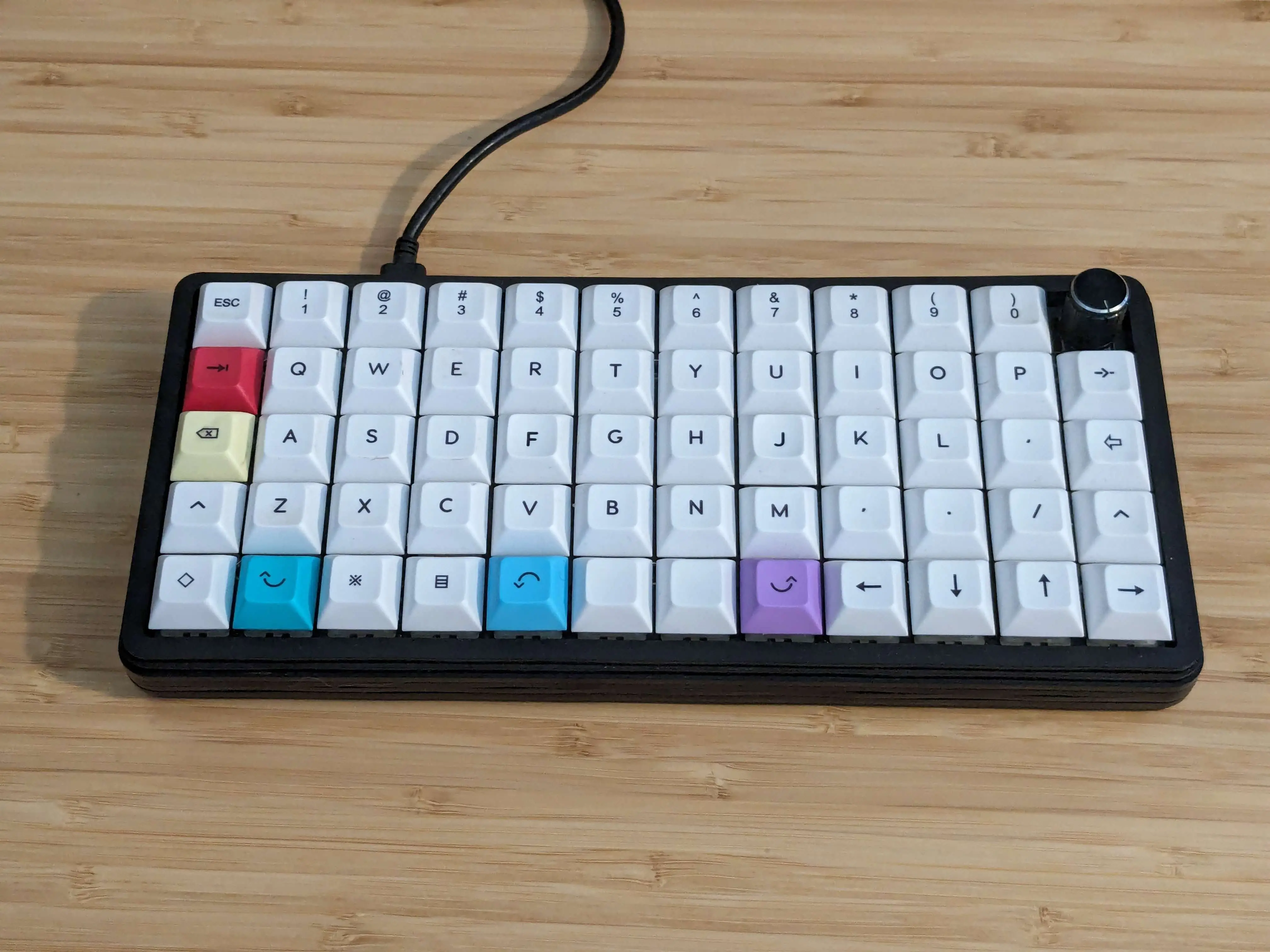
I soon grabbed a tiny 60% keyboard with a rotary encoder knob from an Etsy shop owner called Pabile. The little P60 ortholinear board was a lot to get used to, and I loved the challenge. To get the most out of it I had to learn to type again - and chose to do so with the Colemak-DH layout. I have no regrets.
Split, columnar
The end game for me was to take what I learnt from my P60, and apply it to a smaller split board. Finally I took the leap with The ZSA Voyager. It took some time to make the transition but it’s now my firm favourite.
Despite completely overhauling my typing experience, with both an entirely different style of input device and a completely different input layout, I have fully retained the ability to type quickly with a regular staggered qwerty keyboard. So that’s nice.
Integrated Laptop Keyboard?
The world of programmable keyboards opened my eyes to the shortcomings of integrated keyboards. But luckily there are smart people out there who offer solutions. And so, by using Kanata you can reprogramme your keyboard at the software level. As such, I now have access to an arrow / navigation layer easily activated with my thumb, and home-row mods if I’m feeling spicy. I keep it basic, but it augments the experience just enough for my liking.
Software
OS
I use NixOS (btw) for both my main machines. I also dual boot with Windows on my desktop machine, but that’s mostly for gaming or anything I can’t run on linux (which is vanishingly few things these days).
Code
Unfortunately it’s VSCode, despite efforts here and there to move away from it. Occasionally Vscodium instead - but I usually end up back on mainline vscode because I just want to get stuff done.
I’ve tried moving to nvim and had a pretty good time with helix when I want to try modal editing with a somewhat “out-of-the-box” experience, but I’ve never been able to get things set up in a way that feels like it’ll stick.
Browser
I’m stuck on Chrome - as is like 70% of the world. I dabble a lot with Zen, but I know I’ll need to properly commit to making the switch soon.
Notes
Obsidian… It’s pretty decent but I think I might drop it one of these days. I’ve been mostly using it for some of the calendar / tracking community features, sync, and the daily notes. It’s great that the notes are all just markdown, so maybe if I do switch it’ll be smooth.
Some time last year I switched to Proton services, away from Outlook. The mail service has come a long way since I first signed up with them, and I’m really enjoying not having ads in my inbox any more.
VPN
Given that the UK government has started requiring age verification for a swathe of the internet, I’m making good use of Proton VPN. I was using it before anyway, especially when on public wifi, etc. Now I feel the expense is even more justified.